A Global Location Number (GLN) is a standardized identifier used to uniquely identify trading partners and their locations. Under DSCSA, GLNs help ensure precise tracking of product movement by clearly identifying manufacturers, distributors, dispensers, and the locations involved in receiving, shipping, and returning pharmaceutical products.
All About GLNs
What is a GLN?
A GLN, or Global Location Number, is a unique identifier that lets businesses know who is involved in transactions and where things are located throughout the supply chain.
Establishing and submitting your GLN(s) is imperative to continue to conduct business with Masters. We are requesting all customers to have one or more GLNs on file with Masters to allow the parties in the supply chain to mature and test their systems and processes.
Please be aware that Masters may not be able to see customer GLNs in the GS1.org portal.
What does a GLN look like?
A GLN is a 13-digit number consisting of a company prefix, a location reference and a check digit.
How do I obtain my GLN?
GLNs are typically created by the customer who has purchased a license to create GLNs from Global Standards 1 (GS1) or under GS1’s managed GLN program based on submissions by wholesalers or group purchasing organizations.
Each customer should obtain a GLN for:
Sold To – represents the party acquiring ownership of the DSCSA in-scope product
Ship To – represents the physical location where the DSCSA in-scope products are being
These numbers may be the same for some customers if their Sold-To and Ship-To addresses are identical.
If you have not created a GLN or need assistance retrieving a GLN, visit gs1us.org. Please be advised that a registration fee is involved.
How can I find my GLN on the GS1.org site?
GS1 has a search function to help locate the GLN: Search by Party Name | GEPIR (gs1.org). The search is available by company or GLN.
For health system-covered entities, do contract pharmacies count as locations?
If the health system-covered entity owns the contract pharmacy, then the contract pharmacy is a location within the health system. If, on the other hand, the contract pharmacy is separate, it will need to have its own Ship-To GLN. In that situation, the Sold-To GLN will be the health system-covered entity.
Where can I find my GLN?
You can find your GLN in a few ways:
Visit the GS1US.org website to search for your GLN.
Contact your Masters Customer Support team.
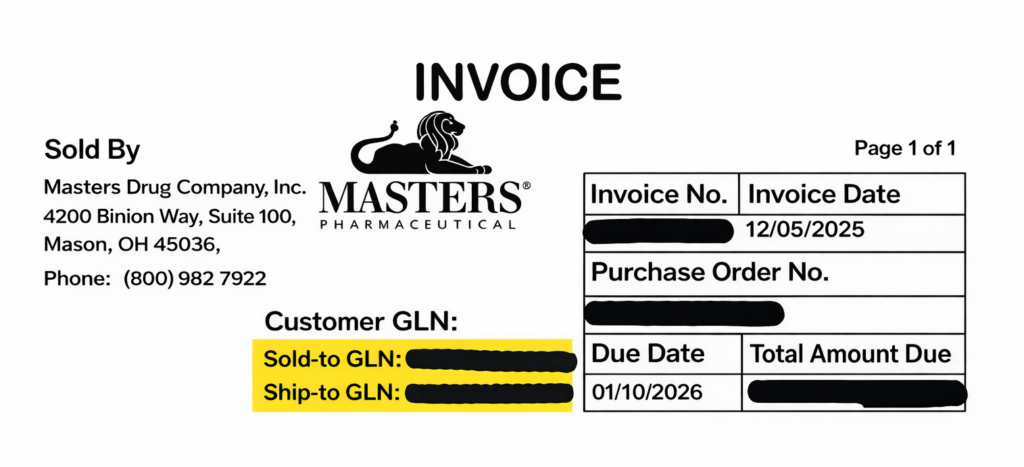
Masters has begun printing Sold-To and Ship-To GLN’s on invoices for many pharmacy customers. If we do not have a GLN on file for you, these fields will populate with a series of zeroes. Here is a sample invoice:
How do I request a GLN?
Before requesting a GLN , please be sure to confirm that you do not already have a GLN by searching the my.GS1US.org website or by contacting your Masters Customer Support team to see if we have the GLN(s) assigned to your account loaded in our system.
If you are unable to locate your GLN:
Masters can assist independent and small businesses with nine or fewer locations (with the exception of government facilities) in getting their GLN(s) as a GS1 US GLN issuing partner. This is at no cost to you.
Customers with more than nine locations will need to visit the my.GS1US.org website to create (a) GLN(s).
How can I identify if a distributor created a GLN?
GLNs created by GS1 based on information provided by distributors or GPOs begin with either 1100 or 1200. Additionally, some GS1 issued Single Location GLNs also begin with 1100 or 1200.
Is my GLN the same for all locations?
If you have more than one Ship-To location or if your Sold-To location is separate from your Ship-To location, you will need a GLN for each distinct location. If your Sold-To and Ship-To location are the same, you only need one GLN.
What if the GLN I have in my records is different from what Masters has on file or if there are multiple GLNs assigned to my location?
A particular location only needs a single GLN to identify itself. The same GLN should be used for all suppliers servicing that location. If the GLN(s) you have are different from the ones Masters has on file (and at the top of your invoices), please contact your Masters Customer Support team.
What if Masters assigned a GLN to my business and I don’t want to use that GLN?
If for any reason you desire to secure your GLN at your own expense or maintain it with GS1 yourself, we can deactivate the Masters-assigned GLN. Before attempting to secure your own GLNs from GS1, to avoid receiving an error that a GLN already exists, your Masters-assigned GLN will need to be deactivated. Please contact your sales representative at 800.982.7922.
If the ownership or name of a pharmacy or facility changes, does the GLN transfer with this information change?
For most ownership, location and name changes, a new GLN will need to be procured. For more information on the rules regarding GLNs, visit the GS1 GLN allocation rules document.
Does my GLN stay the same no matter what distributor I use?
Yes, GLNs are universal. All suppliers and distributors, that have elected to use GLNs as customer identifiers, will use the same GLN for common customers.
How long does it take for me to get a new GLN assigned?
The process takes just a couple of minutes when we receive a request to assign or correct a GLN.
If I have multiple locations under one GLN indicating common ownership, can I transfer DSCSA in-scope product between locations?
Yes, you may transfer DSCSA in-scope products between locations that share the same Sold-To GLN, which indicates common ownership and control. Should a product be returned following such a transfer, Masters will complete an association test to verify that the returned product matches our historical DSCSA record with the correct Sold-To GLN and product serial number.
Will Masters still be able to assist in requesting GLNs for customers with nine or less locations under the GS1 Managed GLN program?
Yes, Masters will still be able to assist in requesting GLNs for customers with nine or less locations under the GS1 Managed GLN program, with the exception of all government facilities. GS1 will create GLN(s) for the customer based on information provided by Masters and Masters will load the GS1 created GLN to the customer account.
If a Federally Qualified Healthcare Center (FQHC) has more than nine contract pharmacies, are they responsible for obtaining GLNs for those contract pharmacies?
The covered entity only needs to have a GLN as the Sold-To location. The contract pharmacies have their own Ship-To GLNs.
How does a GLN for a contract pharmacy need to be provided since a hospital and pharmacy is involved?
Entities under common ownership frequently use the same Sold-To GLN. For a 340B replenishment account, Masters loads the covered entity GLN as the Sold-To GLN and the contract pharmacy GLN the Ship-To GLN.
Do I input my GLN in the ordering system and how does the GLN transmit through the ordering process?
The ordering process for a customer will remain exactly as it is today. You do not need to enter your GLN. Ordering is done by account number.
What is an sGLN?
An sGLN has a slightly different format from the 13-digit GLN for use in EPCIS files. It has all the similar identifiers as found in the GS1-issued GLN: Sold-To, Sold-By, Ship-To and Ship-From. It is different in format because EPCIS is based on the JSON computer language, which requires this formatting. The GLN and sGLN both point to the same GS1-issued GLN, but sGLN has decimals in the middle of it and the GLN is a straight 13-digit string of integers.
There are GLNs in GS1 that were established by Masters. If I would like to make a change, but I’m not the “owner” of the GLN, how do I make changes?
There is an option in GS1 Data Hub to request a change of “ownership” of the GLN. When you request a change of ownership in the GS1 Data Hub, the GS1 Data Hub automatically sends this request to the entity that owns that GLN.
Is Masters using Bill-To GLNs?
Masters is not using Bill-To GLNs for DSCSA. The Pharma Distribution team uses Sold-To and Ship-To GLNs in our reporting. Sold-To is used to represent the customer’s legal entity (corporation, LLC, etc.). The Ship-To is the physical location receiving the product. The Sold-To and Ship-To can be the same if the billing and shipping addresses are the same.
What should a dispenser do prior to their DSCSA serialization compliance date?
Please use the FDA link to find a full list of actions that should be taken at FDA.gov.
In summary, Masters recommends the following:
All trading partners, including dispensers, are expected to be able to search the repositories where their serial DSCSA transaction information and transaction statements are stored and retrieve the requested information upon
Know how to access DSCSA transaction data through MastersRX.com or your in-house or third-party system where you requested this information to be
Dispensers must confirm that the serial number of the saleable DSCSA in-scope product they intend to return was purchased from Masters before initiating the
DSCSA in-scope product returns where Masters is unable to verify or associate the serial number of the product cannot be accepted as a saleable return under the
Additional information for dispensers from NACDS, NCPA, HDA and NABP about dispenser requirements is available at www.dscsa.pharmacy.
Where can I find more information on the requirements of a pharmacy, and related best practices, to comply with DSCSA?
We recommend that you refer to the FDA.gov website for more information. The American Society of Health-System Pharmacists (ASHP) and National Community Pharmacists Association (NCPA) may also have relevant resources.
Will a pharmacy be able to sell to doctor’s offices or clinics?
Please refer to the FDA guidance found here: FDA.gov.
Am I required to scan all DSCSA in-scope product upon receipt?
Please refer to the FDA guidance found here: FDA.gov.
We supply emergency meds to a treatment facility. Does that facility need a GLN?
The DSCSA defines “wholesale distribution” as the distribution of a drug to a person other than a consumer or patient. However, the law provides for certain exceptions to this definition, including the distribution of minimal quantities of drugs by a licensed retail pharmacy to a licensed practitioner for office use. For transactions exempt under this minimal quantity exception, a GLN is not necessary as there is no need for an EPCIS file with transaction data from the dispenser to the practitioner.
How do I update my GLN?
If you would like to change the GLN currently loaded to the Masters system, please work with your sales representative or account executive. Large groups of 10 or more facilities will need to correct GLNs through GS1.org. Customers will need to additionally follow up with Masters with their new GLN.
Any requests for edits to your GLN for address, Sold-To and Ship-To, should also be directed to your sales representative.